

This page applies to products with AI image or video generation capability. If your product builds on top of an AI model (an “AI wrapper”), these requirements are how review distinguishes a legitimate product from a repackaged model.
What review checks
Independent branding
Required: your own product name and identity. Not allowed: marketing yourself as an AI model brand (e.g., “the official GPT app”) or using a model’s name/logo as your own.
Honest marketing
Required: describe what your product actually does. Not allowed: overstating capabilities, implying endorsement by a model provider, or hiding that output is AI-generated.
Moderation in place
Required: run a content-moderation step on prompts and outputs — your own, or Prompt Sift. Not allowed: shipping an unmoderated raw-model passthrough.
Published content policy
Required: a public AUP covering prohibited content, reporting, and enforcement — use the AUP template. Not allowed: no policy, or one that doesn’t match your actual product.
Deepfakes
Required: if users can upload photos or voice of real people, your terms restrict where that material comes from. Not allowed: face swap, “nudify,” intimate-scene compositing, or any other deepfake feature — whether or not the people involved consent.
Underlying model disclosure
You must clearly disclose the underlying AI models your platform actually uses. Either form of disclosure is accepted:- Document-based: list the model names on your About, Pricing, or Terms page, or on a dedicated page;
- Interface-based: in the image/video generation UI, users can directly see and select different underlying models (e.g., a dropdown, model switcher, or model cards), with each option clearly labeled with the model name.
- Model names are real and specific — vague phrasing such as “AI technology,” “advanced models,” or “30+ models” is not acceptable;
- The models used are industry-mainstream (e.g., Flux, Seedream, Nano Banana/Gemini, GPT Image, Veo, Kling, Seedance, Wan);
- No repackaging or misrepresentation: no free-riding on official brands, no inflated version numbers, no models of unknown origin without safety guardrails;
- If multiple models are offered, every selectable model must meet the requirements above, and switching models must not bypass content-safety filtering.
Truthful model disclosure does not conflict with the independent-branding requirement: listing “images/videos on this product are generated with Flux and Kling” in your docs or UI is compliant disclosure; marketing yourself as the model’s brand (e.g., “the official GPT app”) is the violation.
Content moderation API — Waffo Prompt Sift
A platform-side moderation step is a hard requirement (see content policy requirements below). You can build your own, or integrate Prompt Sift, Waffo’s content-safety check for AI generation.How to set up moderation
1. Deploy scanning at more than one stage.- Before generation — scan user prompts in real time (Prompt Sift covers this stage).
- After generation, before display — scan the AI output before showing it to the user.
- After publication — if your product has a public gallery or feed, scan published images/videos asynchronously.
What Prompt Sift is
Before you hand a user’s text prompt to your generation model, send it to Waffo for a safety check. Prompt Sift primarily intercepts requests involving child-unsafe content — standard practice across the industry (OpenAI, Google, Civitai, and other major AI generation platforms run equivalent checks). It protects your users and your product, and helps you meet the compliance requirements on this page.How it works
1
Your user enters a generation prompt
Any text description the user submits for image or video generation.
2
Your product calls Prompt Sift before generating
Send the prompt to the check endpoint at
https://api.waffo.ai/v1/actions/verification/scan-prompt.3
Act on the verdict
- Pass → call your generation model as normal; the flow is unaffected.
- Block → don’t generate; show the user a friendly message (e.g., “This content doesn’t meet our usage guidelines”).
- Pending review → hold briefly (usually resolved within 1 hour); our human review team makes the final call.
What you get
A simple API: pass us the user’s text prompt, and we return a clear verdict — with minimal impact on your product flow.Content safety API reference
Endpoint reference, request/response format, and integration examples.
client.contentSafety.scanPrompt(...) — the fastest way to integrate.
SDK integration guide
Install and authenticate the TypeScript or Go SDK, then call content safety with a single method.
Content policy requirements
You must publish a standalone AUP page, or a dedicated chapter in your Terms of Service, covering all of the following. Six prohibited-generation categories (listed one by one — no vague catch-alls):- Pornography / NSFW
- Violence / gore
- Hate speech
- Child-unsafe content (CSAM)
- Deepfakes / impersonation — see what counts as a deepfake
- Copyright / trademark infringement
- Enforcement actions — account bans, credit forfeiture, content removal, etc.
- A user reporting channel — users can report violating generated content, and you describe how reports are handled.
- A description of platform-side content moderation — your moderation workflow (automated filtering, human review, etc.).
AUP template
A complete Acceptable Use Policy covering everything above — the six prohibited categories listed one by one, plus enforcement, reporting, and moderation sections. Replace the placeholders and publish.
Real-person uploads
If your product lets users upload photos or voice recordings of real people, your Terms of Service or AUP must explicitly restrict where uploaded material comes from. Either approach works:- Your terms explicitly prohibit uploading another person’s photos or voice without their consent; or
- At upload, users must actively confirm “This is my own material, or I have permission from the people in it.”
What counts as a deepfake
Products whose core business is deepfaking real people are a prohibited category and cannot be accepted on any payment channel. This goes beyond the content your policy bans users from generating — if the product itself offers these features, it will not pass review. Definition: the output replaces or disguises one real person’s identity or face as another real person’s, or composites two real people into a fabricated intimate scene — whether or not the people involved consent.The four forms
1. Face swap Putting A’s face onto B’s photo or video, or “turning” A’s photo into another specific real person — swaps between celebrities, public figures, and ordinary users all count. Any face-swap entry point or menu item on your site is enough to count. Real case: Indian actress Rashmika Mandanna’s face was swapped onto someone else’s body in a video that went viral and drew public attention to deepfake technology (NewsBytes; for more cases, see HyperVerge: 20+ real deepfake examples).
A deepfake video from the “Unreal Keanu Reeves” TikTok account — the person on screen is not Keanu Reeves
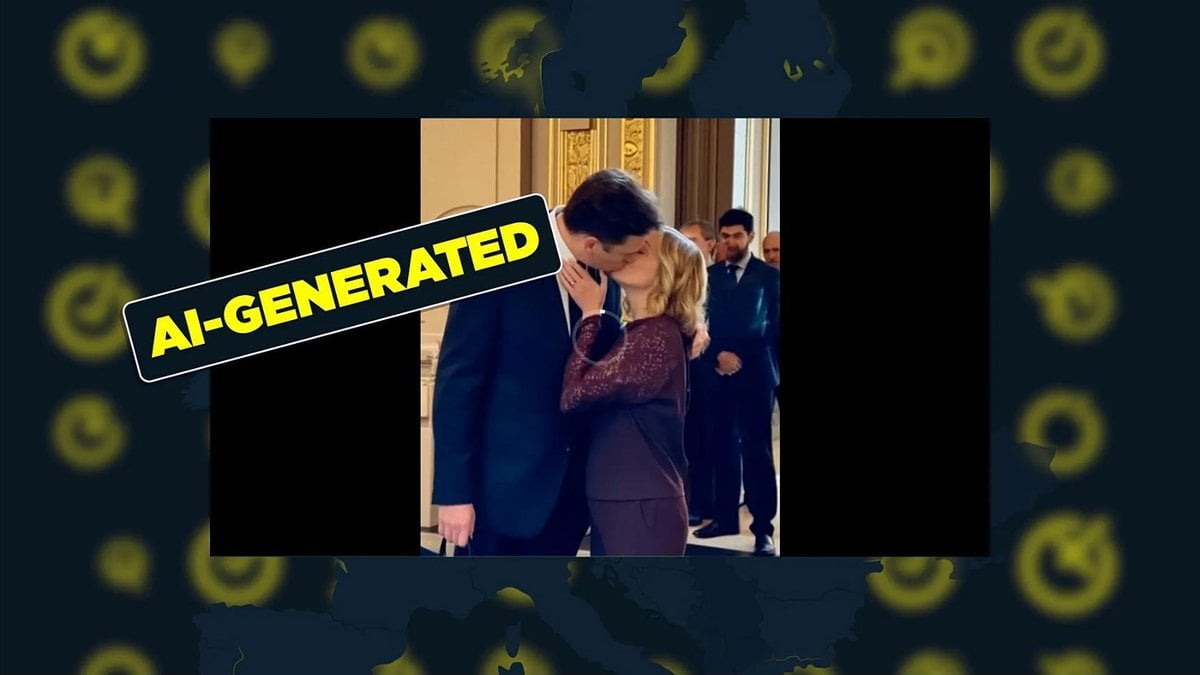
AI-generated video of Meloni and Musk “kissing.” Source: Euronews

Left: the deepfake video. Right: the real Zelenskyy. Source: UVA Today
Before you request review
🔴 items decide whether an AI generation product is approved. 🟡 items strengthen the case.1
🔴 Must be done
- Product uses independent branding — not an AI model’s name or logo as your own
- Marketing is accurate — no overstated capabilities, no implied provider endorsement
- Underlying models are disclosed truthfully and specifically, and are industry-mainstream (model disclosure)
- A moderation step runs on prompts and outputs — your own, or Prompt Sift
- A public AUP page or ToS chapter lists the six prohibited categories one by one (content policy)
- At least one real, monitored user reporting channel exists
- The product has no deepfake features — including any face-swap entry point or menu item
- If users can upload photos or voice of real people, your terms restrict where that material comes from
- Enforcement actions in your policy are ones you can actually carry out
2
🟡 Strongly recommended
- Output is labeled or otherwise disclosed as AI-generated
- An appeals path exists for wrongly-actioned users
- Age verification in place if you allow any restricted content