> ## Documentation Index
> Fetch the complete documentation index at: https://docs.waffo.ai/llms.txt
> Use this file to discover all available pages before exploring further.
# Payout Accounts
> Set up, change, and manage your payout accounts
Payout accounts are where your payouts arrive. They live at the merchant level — every store you own shares the same set of accounts. You can keep multiple on file and switch the default at any time.
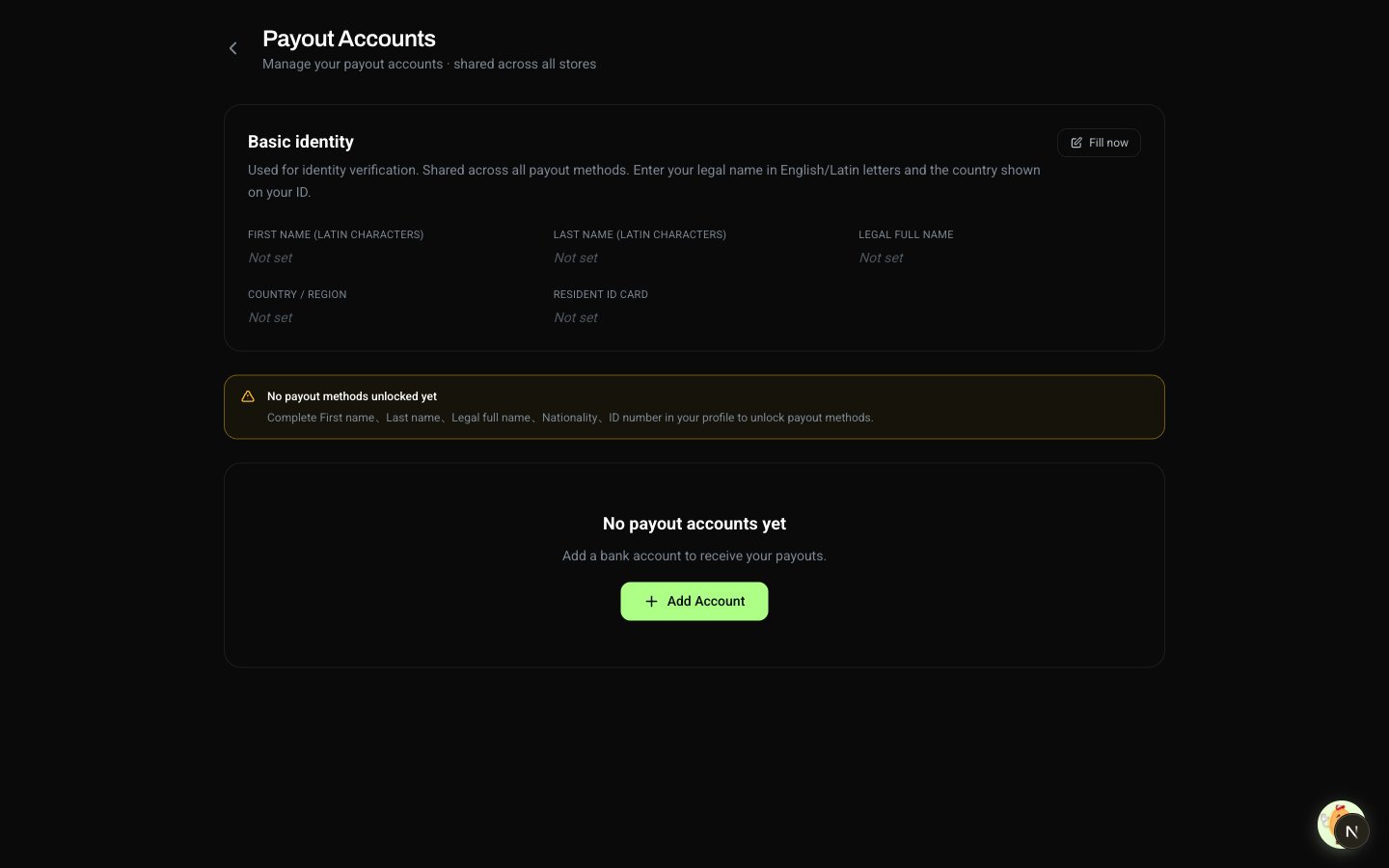 ## Setting Up a Payout Account
You can't add a payout account without a verified identity — the holder name on every payout is taken from your legal name. See [Identity Verification](/merchant/identity-kyc) if you haven't done this yet.
Click your avatar in the top-right and select **Payout Accounts**.
Choose **Bank Card** or **Alipay** and fill in the fields. Your name is filled in automatically from your identity — you don't type it here.
On your first payout to a new account, the bank confirms the holder name matches your verified identity. Once matched, the account is trusted for all future payouts.
Sensitive fields — ID number, bank account number, Alipay account — only show the last few characters after saving. The full value is only used when a payout is being processed.
## Available Payout Methods
| Method | Fields required |
| ------------- | --------------------------------------------------------------------------------------- |
| **Bank Card** | Bank (selectable from the list in the dashboard), account number, purpose of remittance |
| **Alipay** | Mobile number **or** email registered with Alipay, purpose of remittance |
**Current coverage:** mainland China, settled in CNY. We are actively expanding to more regions and currencies — contact support to let us know what matters most to you so we can prioritize.
Tell us which payout method and which region matters to you. Submissions feed directly into our roadmap prioritization.
## Changing Your Payout Account or Default
You can add a new account, edit an existing one, set a different default, or remove an account at any time.
| Action | What it does |
| ------------------ | ------------------------------------------------------------------------------------------------------ |
| **Add** | Save a new bank card or Alipay. The same card or Alipay can't be added twice |
| **Edit** | Update details on an existing account. The holder name is read-only — it tracks your verified identity |
| **Set as default** | The default is used for every payout unless you switch before submitting |
| **Delete** | Remove an account. Only allowed when no payouts are pending against it |
Switching the default doesn't affect payouts already in flight. They land in the account you originally chose at submit time.
## Common Issues
The most common cause is an incomplete identity. Without a verified identity, the form won't save. Open **Profile**, fill in the required fields, then come back. See [Identity Verification](/merchant/identity-kyc).
The holder name on every payout is taken from your verified legal name — automatically. This avoids typos that would bounce a payout. If your legal name needs to change, update it on **Profile**; if it's already locked, contact support.
No. If you submit a card or Alipay account that's already on file, nothing changes. Add a different account, or edit the existing one.
Use Alipay, or contact support so we can prioritize adding your bank.
## Setting Up a Payout Account
You can't add a payout account without a verified identity — the holder name on every payout is taken from your legal name. See [Identity Verification](/merchant/identity-kyc) if you haven't done this yet.
Click your avatar in the top-right and select **Payout Accounts**.
Choose **Bank Card** or **Alipay** and fill in the fields. Your name is filled in automatically from your identity — you don't type it here.
On your first payout to a new account, the bank confirms the holder name matches your verified identity. Once matched, the account is trusted for all future payouts.
Sensitive fields — ID number, bank account number, Alipay account — only show the last few characters after saving. The full value is only used when a payout is being processed.
## Available Payout Methods
| Method | Fields required |
| ------------- | --------------------------------------------------------------------------------------- |
| **Bank Card** | Bank (selectable from the list in the dashboard), account number, purpose of remittance |
| **Alipay** | Mobile number **or** email registered with Alipay, purpose of remittance |
**Current coverage:** mainland China, settled in CNY. We are actively expanding to more regions and currencies — contact support to let us know what matters most to you so we can prioritize.
Tell us which payout method and which region matters to you. Submissions feed directly into our roadmap prioritization.
## Changing Your Payout Account or Default
You can add a new account, edit an existing one, set a different default, or remove an account at any time.
| Action | What it does |
| ------------------ | ------------------------------------------------------------------------------------------------------ |
| **Add** | Save a new bank card or Alipay. The same card or Alipay can't be added twice |
| **Edit** | Update details on an existing account. The holder name is read-only — it tracks your verified identity |
| **Set as default** | The default is used for every payout unless you switch before submitting |
| **Delete** | Remove an account. Only allowed when no payouts are pending against it |
Switching the default doesn't affect payouts already in flight. They land in the account you originally chose at submit time.
## Common Issues
The most common cause is an incomplete identity. Without a verified identity, the form won't save. Open **Profile**, fill in the required fields, then come back. See [Identity Verification](/merchant/identity-kyc).
The holder name on every payout is taken from your verified legal name — automatically. This avoids typos that would bounce a payout. If your legal name needs to change, update it on **Profile**; if it's already locked, contact support.
No. If you submit a card or Alipay account that's already on file, nothing changes. Add a different account, or edit the existing one.
Use Alipay, or contact support so we can prioritize adding your bank.