> ## Documentation Index
> Fetch the complete documentation index at: https://docs.waffo.ai/llms.txt
> Use this file to discover all available pages before exploring further.
# Identity Verification
> Verify your identity to receive payouts
Verify your identity before you add a payout account. Every payout is sent to a holder name derived from your verified identity — getting that name exactly right is how we make sure your funds arrive.
This page covers **individual identity verification**, used when you pay out to a personal bank account or Alipay. If you pay out to a **company account**, see [Paying out to a company account](#paying-out-to-a-company-account) below.
Identity verification is required before you can add a payout account and request payouts.
## What you'll provide
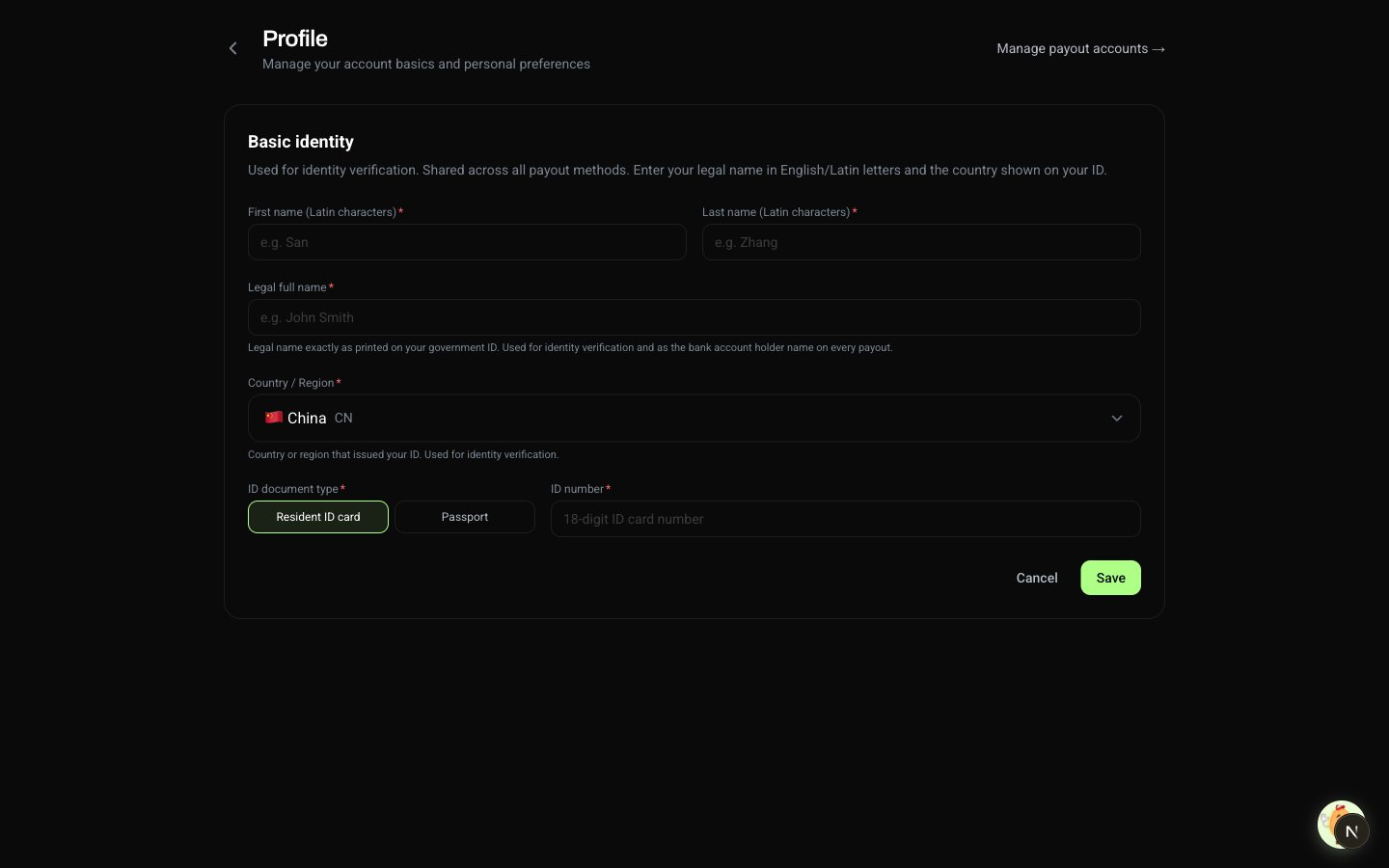 | Field | Format | Notes |
| ------------------- | ------------------------------------------------------- | --------------------------------------------------------------------------------------------------- |
| **First name** | Latin characters, 1–64 chars | Romanized given name |
| **Last name** | Latin characters, 1–80 chars | Romanized family name |
| **Legal full name** | Local script (e.g. 张三), 1–128 chars | The most important field. Must match your ID exactly — this becomes the holder name on every payout |
| **Nationality** | ISO 3166-1 alpha-2 (e.g. CN) | Country of citizenship |
| **ID type** | National ID **or** Passport | National ID for mainland China, passport for others |
| **ID number** | 18 digits (National ID) or 7–13 alphanumeric (Passport) | Must match the ID type |
Legal full name is the field people most often get wrong. Compare it to your ID character-by-character — including spaces and punctuation — before you save.
## When you can edit your identity
Whether the core fields are editable depends on your payout history:
* **No payout activity yet** — legal name, ID number, nationality, and ID type can all be edited freely. Previously empty fields can also be filled in any time.
* **A payout is in progress, or you have one or more successful payouts on record** — the core fields are locked from self-edit. Contact support if you legitimately need to update one (for example, a legal name change with supporting documentation).
Sensitive fields (ID number, bank account number, Alipay account) are stored encrypted. The dashboard only shows the last few characters.
## Paying out to a company account
If you'll receive payouts on a **company bank account** instead of a personal one, the identity used for the holder-name match is your **company**, not you as an individual. The fields you provide are different — they describe your legal entity rather than your personal ID.
**Coming soon.** Company-entity identity verification is being finalized. Until it's released, all payouts use the individual identity on your account. Watch this page for updates.
## Where to find it
The identity form lives on the **Profile** page. Open it from the user menu (top-right avatar) → **Profile**.
| Field | Format | Notes |
| ------------------- | ------------------------------------------------------- | --------------------------------------------------------------------------------------------------- |
| **First name** | Latin characters, 1–64 chars | Romanized given name |
| **Last name** | Latin characters, 1–80 chars | Romanized family name |
| **Legal full name** | Local script (e.g. 张三), 1–128 chars | The most important field. Must match your ID exactly — this becomes the holder name on every payout |
| **Nationality** | ISO 3166-1 alpha-2 (e.g. CN) | Country of citizenship |
| **ID type** | National ID **or** Passport | National ID for mainland China, passport for others |
| **ID number** | 18 digits (National ID) or 7–13 alphanumeric (Passport) | Must match the ID type |
Legal full name is the field people most often get wrong. Compare it to your ID character-by-character — including spaces and punctuation — before you save.
## When you can edit your identity
Whether the core fields are editable depends on your payout history:
* **No payout activity yet** — legal name, ID number, nationality, and ID type can all be edited freely. Previously empty fields can also be filled in any time.
* **A payout is in progress, or you have one or more successful payouts on record** — the core fields are locked from self-edit. Contact support if you legitimately need to update one (for example, a legal name change with supporting documentation).
Sensitive fields (ID number, bank account number, Alipay account) are stored encrypted. The dashboard only shows the last few characters.
## Paying out to a company account
If you'll receive payouts on a **company bank account** instead of a personal one, the identity used for the holder-name match is your **company**, not you as an individual. The fields you provide are different — they describe your legal entity rather than your personal ID.
**Coming soon.** Company-entity identity verification is being finalized. Until it's released, all payouts use the individual identity on your account. Watch this page for updates.
## Where to find it
The identity form lives on the **Profile** page. Open it from the user menu (top-right avatar) → **Profile**.